
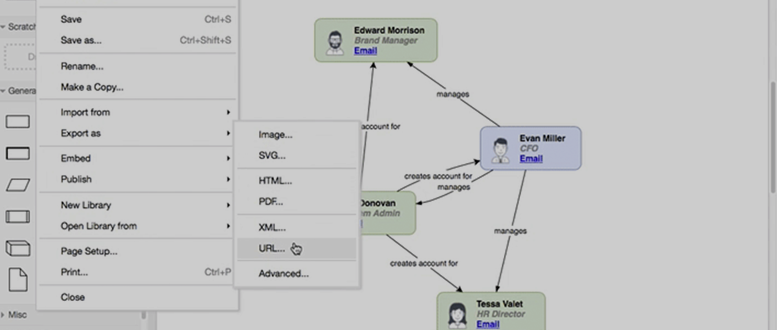
Export Diagrams as URLs
Diagrams (below a certain size) can now be exported as URLs https://www.draw.io/...
By Gaudenz Alder |
Sign up for our free webinar Visualize it: The Secret of High-Performing Teams
Sign up for free webinar164 Results for: feature
Diagrams (below a certain size) can now be exported as URLs https://www.draw.io/...
By Gaudenz Alder |

New props plugin (p=props) for showing metadata in chromeless mode / lightbox show example
By Gaudenz Alder |

"Number" Plugin for enumerating elements (via View, Number) Install via Extras, Plugins, Add
By Gaudenz Alder |

For an updated version of this blogpost see, The Ultimate Guide: Migrating to draw.io from Gliffy draw.io is the most powerful diagramming add-on for Confluence. It allows you to create and collaboratively develop graphs and diagrams of any kind, directly…
By Antonia Prahm |

For our latest blogpost on this topic, see How to build multipage diagrams in draw.io Confluence diagrams with multiple pages Have you ever faced the challenge where you must put an enormous amount of information in one single diagram? That is not a problem…
By Antonia Prahm |

This blogpost has since been updated. Please see: A vision of revision in Atlassian Confluence One of the advantages of Confluence is that its revision history supports audits: Each version of a page is always visible, comparable with other versions, and an…
By Antonia Prahm |

Find Plugin now supports regular expressions & searches metadata. To install it permanently do this.
By Gaudenz Alder |

There are many time-savers in draw.io: For example, you can drag a shape over a container, and you'll see the container outline highlighted in blue. When you drop the shape you have dragged, the container will automatically resize to include the shape you…
By Gaudenz Alder |

Do you often include your own graphics and icons in your diagrams? The new version of the diagramming tool draw.io for Confluence allows you to quickly and easily import your own libraries and use your custom Shapes. In this tutorial, we will show you how to…
By Inga Clasen |

You can save a lot of time when diagramming with draw.io. If you know which shapes you'll need to use in your diagram, you can simply click on them in the shape library, to add them quickly to the drawing area. Now, these shapes will appear neatly stacked…
By Gaudenz Alder |

For our latest blogpost on this topic, see How to build multipage diagrams in draw.io Some diagrams are too large, too complex to fit on just one page. And it's actually sensible to break the information up over multiple pages so that viewers are not…
By Gaudenz Alder |
Incremental find plugin in Edit, Find (Ctrl+F) https://www.draw.io/?splash=0&p=find Install permanently via Extras, Plugins, Add (see here)
By Gaudenz Alder |

Seibert Group
We usually reply within a few minutes
Our chat is provided by HubSpot. Loading it also loads HubSpot's visitor tracking and advertising pixel on this site. Please agree to use the chat. Further information on data privacy